 Adobe
Adobe  Sitecore
  Gradial
  PEGA
PEGA Why patient enrollment stalls in the handoffs, and what orchestration actually fixes
Jul 08, 2026 | 7 min read
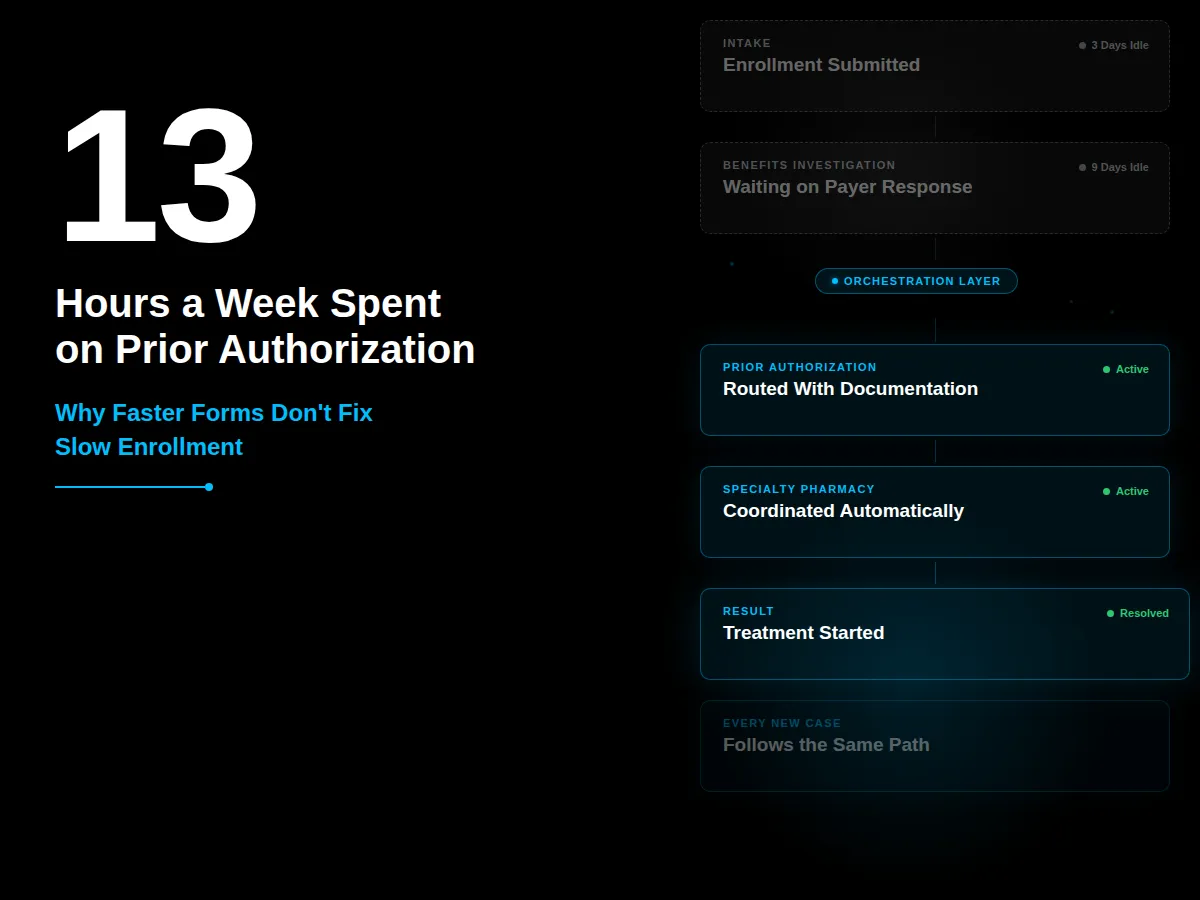
A patient submits an enrollment form for a new specialty therapy. The form is short. The portal works fine. Three weeks later, the patient still hasn't started treatment. Nobody lied to them. Nobody sat on the case. The delay happened in the space between departments: benefits investigation was waiting on a payer response, the provider's office submitted incomplete clinical documentation, and the specialty pharmacy didn't know the case existed yet because nobody told them.
Each team involved would say they did their job. And they're right. The problem isn't any single step. It's that nobody owns the space between the steps.
Where does enrollment actually break down?
Enrollment depends on a sequence: intake, consent validation, benefits investigation, insurance verification, prior authorization, missing information outreach, specialty pharmacy coordination, hub services, copay eligibility, clinical documentation, and status communication. Most process improvement efforts focus on making one of these steps faster. Prefill a form. Auto-route a document. Flag missing fields.
That works, as far as it goes. But if the handoffs between those steps aren't coordinated, the process becomes a collection of disconnected tasks. Benefits investigation is waiting on payer data nobody chased down. The provider's office doesn't know their submission was incomplete. Patient services doesn't know the case is stuck until the patient calls to ask why nothing has happened.
The friction shows up as an administrative burden that's well documented outside of pharma too. The American Medical Association found that practices complete 39 prior authorization requests per physician per week, spending roughly 13 hours a week on the process. 40% of physicians have staff whose job exists solely to handle prior authorization. (American Medical Association, 2025) That's the provider side of the same handoff problem pharma patient services teams face from the other direction. Nobody owns the gap, so both sides burn hours chasing information the other side already has.
What does it mean to orchestrate enrollment instead of just automating it?
Orchestration means the system coordinates the work, not just stores the data. In practice, an enrollment case starts with intake from a portal, fax, provider office, call center, EHR connection, or third-party hub. The system captures the request, identifies the patient, connects the provider, validates consent, and determines which program or therapy the enrollment belongs to.
From there, the system guides the workflow. It knows which steps are required, which documents are missing, which payer checks need to happen, which teams need to act next, and what communications should go to the patient, provider, hub, or pharmacy. A strong orchestration model uses business rules, automated workflows, integration events, case management, task routing, and service milestones, with human review built in at the points that require judgment. AI can assist with document extraction, summarization, and missing-field detection, but a person still owns the regulated decisions.
How is this different from the automation most teams already have?
Automation makes an individual step faster. A form prefills. A document routes to the right queue. A task gets created without someone typing it in manually. That's real progress, and most pharma patient services teams have already invested in it.
Orchestration manages the full journey across people, systems, rules, exceptions, and handoffs. The system understands the state of the case: what's complete, what's missing, what's blocked, who owns the next step, and what happens if the case falls outside the standard path. Automation improves a task. Orchestration improves the operating model underneath all the tasks. Patient access delays are rarely caused by one slow task. They're caused by fragmented workflows, unclear ownership, missing information, and disconnected systems, exactly the pattern CI's framework for a connected pharma enterprise is built to address at the architecture level.
How does MuleSoft fit into an orchestrated enrollment process?
Enrollment rarely lives entirely inside Salesforce. It depends on third-party systems: benefits verification platforms, payer APIs, electronic prior authorization vendors, specialty pharmacy systems, hub service platforms, EHRs, document management systems, consent platforms, and copay or affordability vendors. MuleSoft is usually the integration backbone that lets orchestration work across that broader ecosystem.
MuleSoft creates reusable APIs, manages system-to-system communication, transforms data between formats, and reduces the point-to-point integration sprawl that builds up when every new vendor gets connected with a one-off script. In a mature architecture, Salesforce owns the workflow experience and case orchestration, while MuleSoft connects the systems that provide eligibility, coverage, payer, pharmacy, document, and status data. That division of labor is part of what separates Salesforce's approach from platforms built primarily for structured content and regulatory workflows. Salesforce shouldn't become a pile of brittle point-to-point connections. MuleSoft gives the integration layer room to scale.
What does an orchestrated enrollment case actually look like?
Take a specialty therapy enrollment that comes in through a provider portal. Intake captures the patient and provider information automatically and matches it against existing records. The system checks which documents are required for this specific therapy and flags what's missing before the case sits idle. If clinical documentation is incomplete, the system generates the outreach to the provider's office instead of waiting for a case manager to notice three days later.
Benefits investigation runs against the payer API through the MuleSoft integration layer. If prior authorization is required, the case routes to the right queue with the clinical documentation already attached. If the payer requests additional information, the system flags exactly what's missing and who needs to provide it, instead of generating a generic denial notice that sends everyone back to square one.
Specialty pharmacy coordination happens automatically once benefits are confirmed, so the pharmacy isn't hearing about the case for the first time when the patient calls asking where their medication is. Status updates go to the patient, provider, and hub without someone manually checking the case and typing an update.
Where should a patient services team start?
Start by mapping where cases actually get stuck, not where the process documentation says they should get stuck. Pull a sample of delayed enrollments from the last quarter and trace exactly where each one sat idle. In most organizations, the pattern isn't random. The same two or three handoffs account for the majority of delays: benefits investigation waiting on payer response, incomplete clinical documentation from providers, or specialty pharmacy not receiving the case until benefits are already confirmed.
Once those specific handoffs are identified, orchestration can be built around them directly instead of as a full platform overhaul. A phased rollout that fixes the highest-friction handoff first builds trust and produces a visible result before expanding to the rest of the journey.
CI Digital builds enrollment orchestration on Salesforce Life Sciences Cloud, connected through MuleSoft to the payer, pharmacy, and hub systems pharma patient services teams already depend on. Talk to our Salesforce team about where your enrollment process is actually getting stuck.
Frequently asked questions
What is the difference between enrollment automation and enrollment orchestration in pharma?
Enrollment automation speeds up individual tasks: prefilling forms, auto-routing documents, or generating tasks without manual entry. Enrollment orchestration coordinates the entire journey across people, systems, and handoffs, tracking what's complete, what's missing, who owns the next step, and what happens when a case falls outside the standard path. Automation improves a task. Orchestration improves the process that connects all the tasks.
Why does patient enrollment stall even when individual steps are automated?
Because automated steps still depend on handoffs between teams and systems that aren't coordinated. A form can prefill instantly and a case can still sit idle for weeks if benefits investigation doesn't know clinical documentation is missing, or if the specialty pharmacy doesn't learn about the case until someone remembers to notify them. The handoffs, not the individual tasks, are usually where enrollment delays originate.
What role does Salesforce Life Sciences Cloud play in enrollment orchestration?
Salesforce Life Sciences Cloud provides the case management, workflow rules, task routing, and service milestone tracking that let an enrollment case move through intake, benefits investigation, prior authorization, and specialty pharmacy coordination without manual handoffs. It's built to own the workflow experience for the enrollment journey, while integration platforms like MuleSoft connect it to the external payer, pharmacy, and hub systems the process depends on.
How does MuleSoft support pharma patient enrollment workflows?
MuleSoft connects Salesforce to the external systems that enrollment depends on but that Salesforce doesn't natively include: payer APIs, benefits verification platforms, electronic prior authorization vendors, specialty pharmacy systems, and hub service platforms. It creates reusable, governed integrations instead of one-off connections built separately for each vendor, which keeps the integration layer scalable as new systems get added to the process.
Author
Jeff Sumption

Share this article


Subject Matter Expert
Jeff Sumption
Salesforce Solution Architect
Speak With Our Team
Share this article