 Adobe
 Sitecore
 Gradial
 PEGA
AI integration services: how to connect agents to your systems of record
Nov 02, 2026 | 6 min read
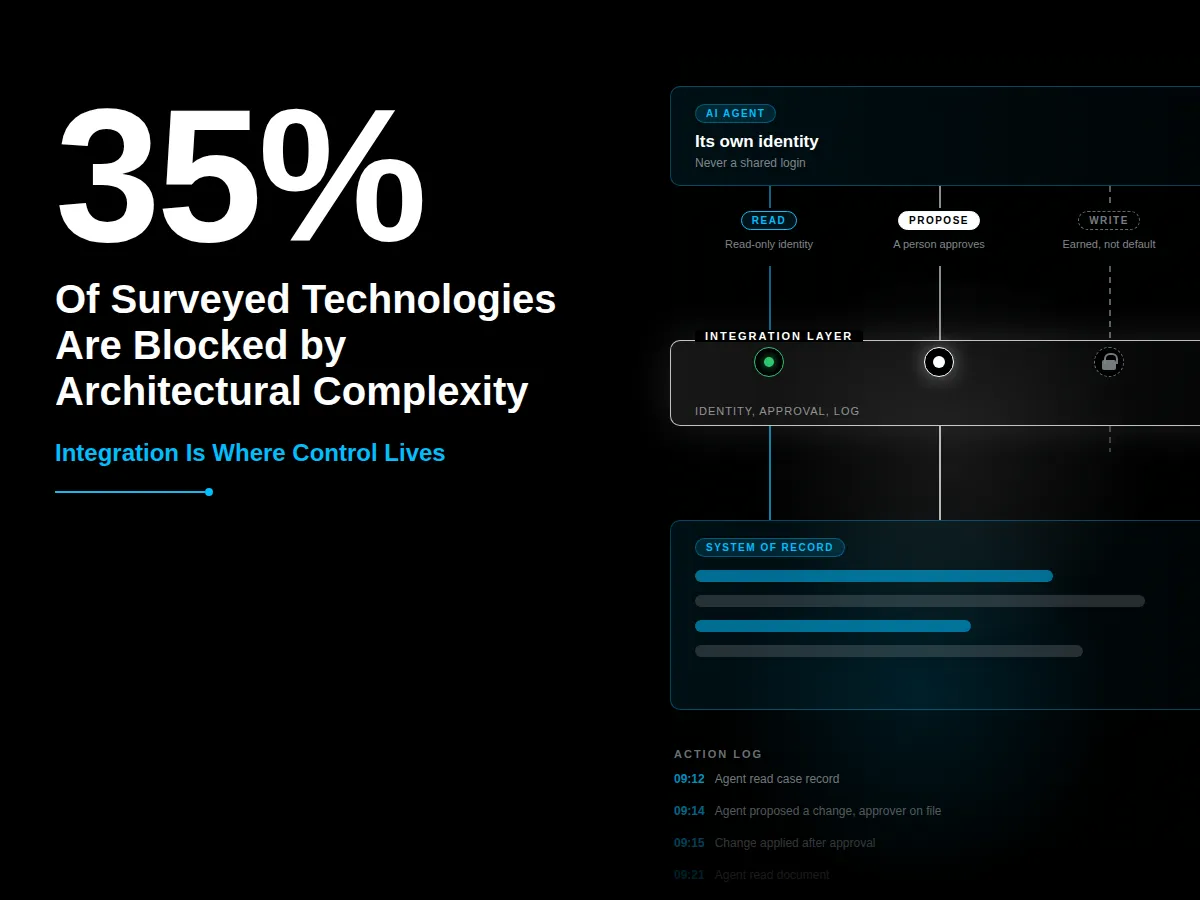
TL;DR: AI integration services connect agents to the systems where work lives, and the connection is where control is won or lost. Start with read-only access, allow writes only through an approval step, and log every action. Gartner found that technical incompatibility and architectural complexity block progress for 35% of the technologies it surveyed.
Picture an agent connected to a case system with one shared admin login. The team set it up that way to get the demo working. Six weeks later, an auditor asks which records the agent changed. Nobody can say.
The model didn't cause that problem. The connection did. Whoever builds the integration decides what the agent can see, what it can change, and what the system records.
This guide covers the patterns that keep control in the integration layer. It goes deeper than the integration section in our guide to AI workflow automation in regulated industries.
What are AI integration services, and why does control live there?
AI integration services connect an AI agent to the systems where your data and work already live. Examples include a case system, a document store, and a CRM. The connection sets what the agent can read and what it can change. That makes the integration layer the right place to enforce rules.
A policy document can't stop an agent from doing something its connection allows. The connection can.
Integration is also where projects stall. Gartner found that technical incompatibility and architectural complexity block progress for 35% of surveyed technologies. It names legacy dependencies, fragmented systems, and inconsistent data models as the causes. (Gartner, 2026)
Forrester's 2026 research finds that three-quarters of enterprise leaders say they are adopting agentic AI. It also notes that a long-running agent behaves like a distributed system, which needs orchestration, identity, and context discipline. (Forrester, June 2026) Whether you buy or build custom AI agents, the integration layer needs the same controls.
Which integration patterns should an agent use?
Start with the first two patterns below. Add the third only after the first two have a clean record.
Read-only retrieval: Read approved records and documents. When to use it: every first deployment. Control: a read-only identity and a list of allowed sources.
Propose and commit: Draft a change that a person approves before the system applies it. When to use it: any change to a regulated record. Control: an approval record with the approver and the time.
Scoped direct write: Write one low-risk field on its own. When to use it: only after a clean track record. Control: a narrow permission and a rollback path, plus a daily sample check.
Read-only retrieval is the safe starting point. Our post on deploying AI agents without disruption calls these safe zones. They let a team learn before any record changes.
In propose and commit, the approver is the control. Our guide to AI training for employees in regulated industries covers what that person needs to learn.
Treat direct writes as a promotion, not a starting point. An agent earns one with weeks of clean approvals on the same step.
Should an agent connect through an API or through the screen?
Prefer an API. An API call has a clear permission and a record of what happened. Screen-level automation, where the agent clicks through the interface, breaks when the screen changes and often needs a broad login.
Use the screen only when no API exists, and treat it as a bridge. Give that login a narrow permission scoped to the one task, and plan to replace it.
How should you handle identity and permissions?
Give every agent its own identity. Don't share a login between agents, or between an agent and a person. A shared login makes the audit trail useless, because you can't tell who did what.
Grant only the access the agent needs to do its job, and review it when the job changes. Forrester advises treating every agent as a governed identity, with identity and policy enforced as code instead of written down.
The data shows the need. McKinsey's 2026 AI trust survey found that 72% of respondents cite cybersecurity as a highly relevant risk. It also found a meaningful gap between the risks respondents consider relevant and the ones they actively mitigate. (McKinsey, March 2026) A scoped identity for each agent closes part of that gap.
What should you log for every agent action?
Write one record for each action: the agent, the system, the record, the change, the approver, and the time. Store the log where the agent can't edit it.
That log feeds the four monitoring signals in our guide to AI risk management for regulated enterprises. Without it, you have nothing to monitor.
How do you plan for failure?
Assume the connection will fail. Set timeouts and retry limits. Make every write safe to repeat, so a retry doesn't create a duplicate. Give every write a rollback path, and build one switch that cuts the agent's access.
Cost can fail quietly too. Gartner warns that agent spending on tokens, APIs, and cloud fees can escalate fast, and it advises monitoring spend closely. Set a spending limit for each agent. Our post on the infrastructure nobody builds before they need it covers the cost side in more detail.
Test every connection against a copy of the data first. Include a bad input and a revoked permission in the test.
What should you ask a partner that offers AI integration services?
Four questions separate a strong partner from a weak one. Does each agent get its own identity? Can the agent write only through approval? Where does the action log live, and can the agent edit it? How do you cut the agent's access in one step?
A partner who can't answer these is selling the connection and skipping the control.
Where should a team start?
Pick one workflow and one system. List what the agent needs to read. The data access decision from your AI readiness assessment becomes that permission list.
Create a read-only identity, and test the connection against a copy of the data. Add the propose-and-commit step only after the read path works. Our 90-day plan for your first AI agent shows how to pace it.
If you'd like a second set of eyes on the integration plan, CI will work through it with your team. Talk to CI about connecting your agents.
Frequently asked questions
What are AI integration services?
AI integration services connect AI agents to the systems where work and data already live, such as case systems, document stores, and CRMs. They set what the agent can read, what it can change, and what the system records about each action.
How do you connect an AI agent to a system of record safely?
Start with read-only access through a separate identity for the agent. Let the agent propose changes, and have a person approve them before the system applies them. Log every action.
Should an AI agent use an API or screen automation?
Use an API when one exists. An API has defined permissions and a clear record of what happened. Use screen automation only as a bridge when no API exists, and give it a narrow login scoped to one task.
What should you log when an AI agent changes a record?
Log the agent, the system, the record, the change, the approver, and the time. Store the log where the agent can't edit it.
Author

Craig Taylor

Share this article


Subject Matter Expert

Craig Taylor
Practice Lead, CI Digital
Speak With Our Team
Share this article